
Most SEO efforts focus on what users see: content, keywords, and links. But some of the most important ranking factors operate quietly in the background—starting with DNS.
In this first article, I explain why Domain Name System matters for SEO and set the stage for a second, more in-depth follow-up article.
How DNS directly influences SEO performance
DNS is best known for translating human-readable domain names into numerical IP addresses, but its impact extends far beyond basic navigation.
From an SEO perspective, DNS directly influences critical factors such as website speed, uptime, accessibility, and how efficiently search engines crawl and index content.
Slow DNS resolution, misconfigured records, or unreliable DNS services can lead to increased load times, downtime, broken redirects, and ultimately poorer user experience. Those are signals that search engines take seriously when ranking websites.
Why DNS optimisation is no longer optional
In today’s competitive digital landscape, where performance and reliability are essential, understanding how DNS affects SEO is no longer optional.
For website owners, marketers, and IT decision-makers alike, gaining insight into the relationship between DNS and search engine performance can unlock tangible improvements in visibility, credibility, and rankings.
Purpose of this article
I will explore, in a two-part series blogposts, the relationship between DNS and SEO and how optimising DNS can support stronger search performance on your website.
In this first post, I focus on the fundamentals: why DNS matters for SEO, how DNS works, and how DNS settings form a critical part of a website’s technical SEO foundation.
In the second article, I build on this foundation by examining how DNS performance affects SEO in practice, covering loading speed, availability, reliability, and the role of domain names in search visibility.
Together, the two posts provide a complete view of DNS as a strategic asset for long-term SEO success.
What is a Domain Name System?
DNS fundamental role
DNS (Domain Name System) is a fundamental part of how the Internet works, even though it operates in the background. It allows accessing websites using readable domain names instead of numerical IP addresses.
When a user enters a domain in a browser, a DNS resolver searches for the correct IP address by contacting different DNS servers, including root servers, top-level domain servers, and authoritative name servers. This process ensures users and applications are directed to the right website quickly and reliably.
Without DNS the Internet wouldn’t work
DNS is predominantly used in the background; however, every time you get online you are making use of DNS.
The DNS is instrumental to virtually every connection made on the Internet. In fact, the Internet wouldn’t work without the DNS.
The Domain Name System consists of two separate components:
- The first component is a hierarchical distributed database that together holds the naming information for every domain on the Internet. This is called the Authoritative DNS.
- Second, the mechanism that resolves the client’s name queries (for example, your browser) is called a DNS resolver. Its job is to traverse the distributed name space to resolve the IP address for the queried name.
Background
Computers Communicate via the Internet Protocol
The Internet Protocol (IP) developed by Vint Cerf and Robert Kahn, standardises how computers communicate over the Internet. In the early 1970s, computer networks consisted of only a few dozen machines.
Today, the Internet connects billions of devices worldwide, each with its own IP address. When you visit a website, your browser connects to the server’s IP address and retrieves the website’s content, which is then delivered to your device.
The Domain Name System as a Phonebook
The DNS is essentially the Internet phone book, which translates the names you enter in the browser into IP addresses that the computers require to set up connections to other computers
What is a URL?
A URL stands for Uniform Resource Locator, which is the formal technical term for a web address.
A web address is the string you type into a browser to visit a website or a specific web page. URLs identify resources on the internet, such as documents, images, or video files.
Browsers use URLs to retrieve this content. URLs are easier for people to use than IP addresses, which are numerical codes assigned to devices on a network. They help users find web pages or navigate to different domains (distinct website addresses).
URLs are essential to the web. They enable hyperlinks, letting users move between pages. When you click a link or enter an address, the URL appears in your browser’s address bar and directs you to your destination.
There are six different parts of a URL:
- Protocol
- Subdomain
- Root domain
- Path
- Subdirectory
- Slug
protocol
The protocol, or scheme, is the first part of a URL (Uniform Resource Locator). It defines how a browser (the software used to access websites) communicates with the server (the computer hosting the website) and retrieves the resource (the specific file or page you want to see). It sets the rules for data transfer.
The most common web protocols are HTTP (HyperText Transfer Protocol) and HTTPS (HTTP Secure), with HTTPS being secure.
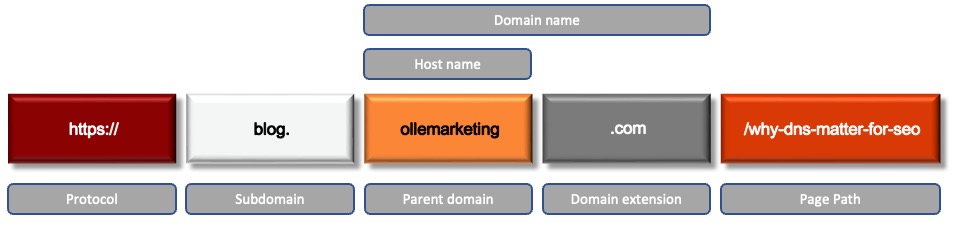
See image 1.
subdomain:
After the protocol (such as https://), a URL may include a subdomain—an optional element used to organise content within a larger website. The subdomain is the part of the web address that appears before the main domain name and helps designate a specific section of the site.
For example, in blog.ollemarketing.com, “blog” is the subdomain, identifying a distinct area within ollemarketing.com.
Subdomains help group related content clearly and logically. Common examples are blog, news, support, or community. While not required, subdomains are popular because they improve site organisation, make navigation easier for users, and help search engines understand a website’s structure.
root domain
The root domain is required for every URL. It consists of two parts: the second-level domain (SLD), which is the name chosen for a website, and the top-level domain (TLD), such as .com, .org, or .net.
Second-level domain (SLD): The unique name registered for your website. It typically reflects your brand or business, like ollemarketing, and is the core identity of your site.
Top-level domain (TLD): The TLD is the last part of a website address and indicates the website’s type or purpose. For example, .com stands for commercial businesses, .org for organisations, .edu for education, and .net for networks.
In ollemarketing.com, “ollemarketing” is the SLD and “.com” is the TLD. Choosing a familiar business name as the SLD with a well-known TLD like .com aligns with user expectations and clarifies your website’s purpose.

path
The path is the location of a resource within a website, usually a page. It follows the root domain and uses forward slashes (/) to separate segments.
The path also affects how search engines view a site’s structure. A clear path helps crawlers understand page relationships and content hierarchy, improving search visibility.
See image 1 and the section about Slug further down.
subdirectory
The subdirectory follows the root domain and acts like a folder in a file system. It adds context by indicating a specific website section. For example, /pricing signals the page covers pricing information, guiding users’ expectations.
Often, a URL ends in a subdirectory when linking to a main section or landing page. While subdirectories look like folders, they may not match physical server directories. Content management systems (CMS) organise URLs to be logical and user-friendly, even if storage is more complex.
Subdirectory names should be clear and descriptive. Common choices like catalogue, blog, pricing, shipping, and help improve usability by making navigation straightforward for both users and search engines.
slug
The slug is the final part of a URL and represents a concise, readable description of a page’s content. It usually appears as a single word or a short phrase separated by hyphens, making the URL easier for both users and search engines to understand. The slug comes after the last slash in the URL, typically following the subdirectory.
The slug for this very article is why-dns-matter-for-seo. See image 1.
DNS hierarchy structure
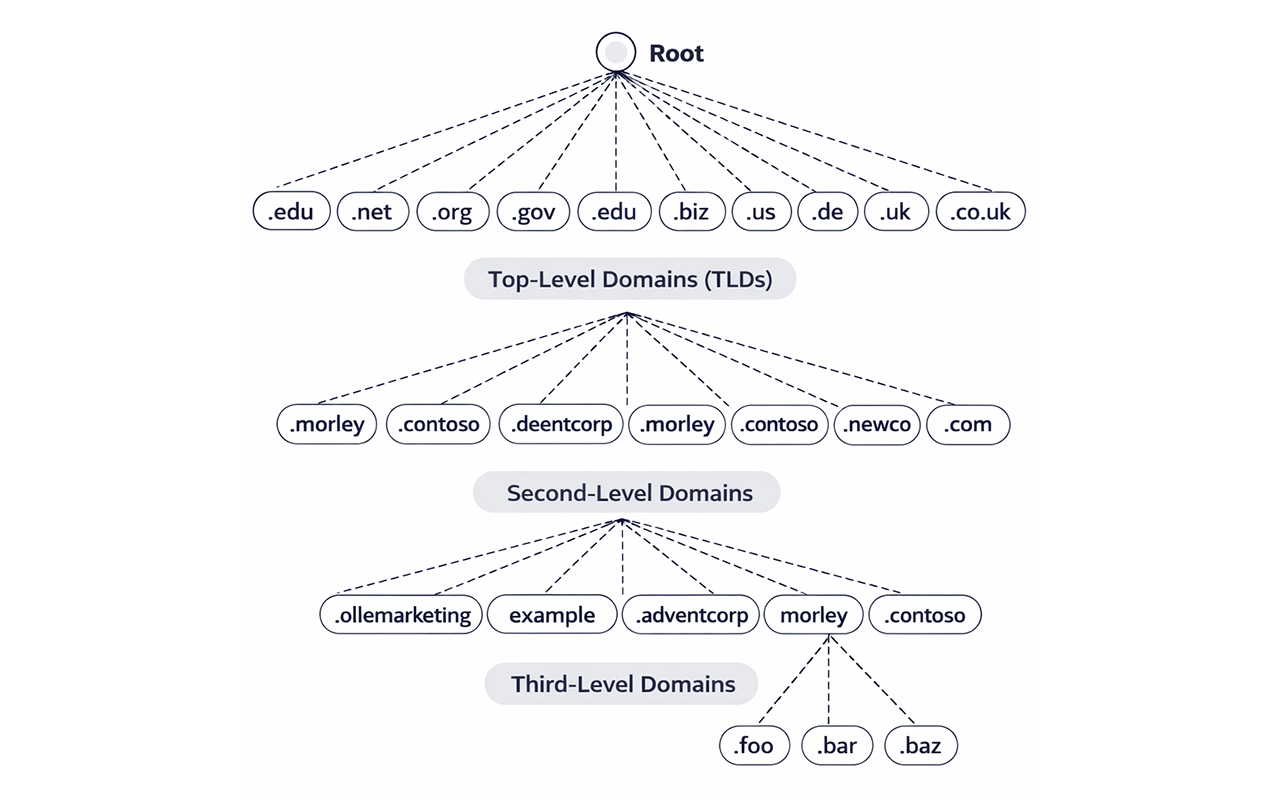
The Domain Name System is organised in a hierarchical, tree-like structure, see image 2. Each level has a specific role in helping translate a domain name into an IP address.
root servers
At the top of the hierarchy are the root servers. These act as the starting point for DNS lookups.
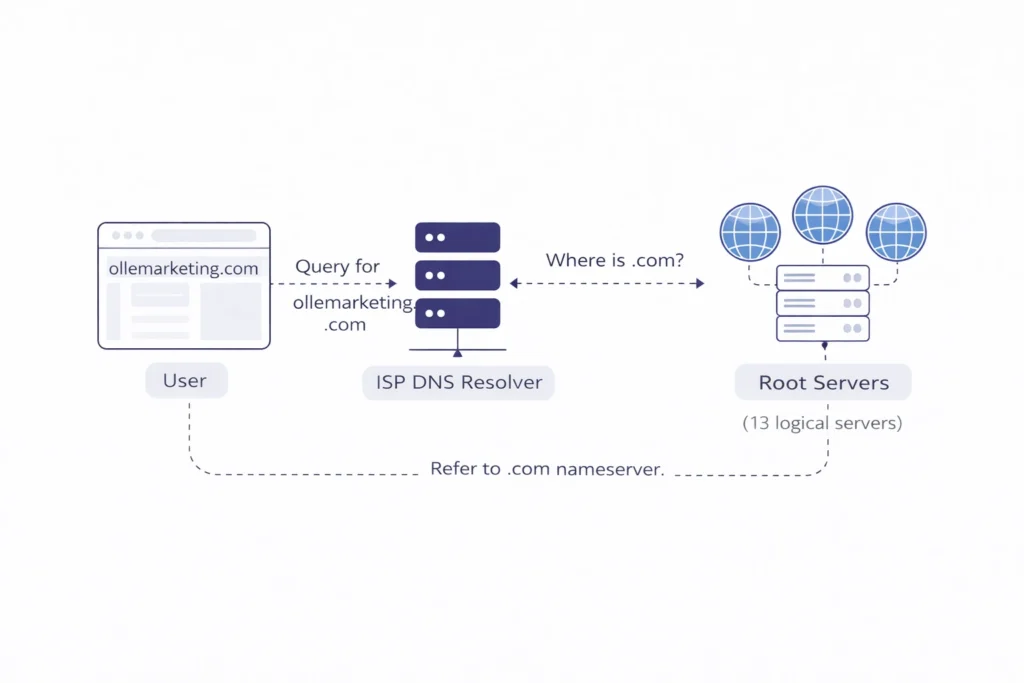
They don’t store IP addresses for websites; instead, they tell the resolver where to find the correct top-level domain (TLD) servers. The root servers don’t have records for all domain names, but they keep track of all top-level domains.
There are 13 logical root server systems distributed around the world.
top level domain servers
Below the root servers are the TLD servers, which the root servers direct queries toward. These handle domain extensions like .com, .org, and .net.
Their role is to direct the query further, this time to the authoritative name servers responsible for the specific domain. The top-level domain is the part of the domain name that appears after the last dot, like .se, .dk, or .com.
Authoritative name servers (second-level domain)
The final step is the authoritative name servers. These servers store the actual DNS records for a domain, such as ollemarketing.com. When queried, they return the correct IP address so the browser can connect to the website.
How DNS works
Understanding DNS and domain names
DNS (Domain Name System) works like the Internet’s address directory. It converts the domain names people type into a browser into the numerical IP addresses computers need to locate and connect to websites.
Every domain name is linked to an IP address, and DNS servers are responsible for maintaining and resolving these mappings. By working together, DNS servers guide users to the correct destination, making web navigation smooth and reliable.
Hosts possess distinct IP addresses and hostnames within a network, whether internal or external. A host’s hostname comprises its local or subdomain(s), parent domain name, and domain extension (e.g., .com, .org, .net), collectively establishing a recognizable identity for clients to engage with. See image 1.
Without DNS, using the Internet would be far less practical, since users would have to memorise long strings of numbers instead of simple, readable website names.
How DNS resolves a domain
Whenever someone enters a domain name, the browser or application sends a DNS request to find the IP address behind it. The browser sends the request to the DNS server of your Internet Service Provider (ISP) and asks for the IP address associated with that domain name.
This lookup typically follows several steps.
- First, the request reaches the top level of the DNS system: the root servers.
- Next, the root servers point to the correct top-level domain (TLD) server, based on the domain extension, such as .com.
- Finally, the TLD server refers the request to the relevant authoritative name server, which provides the final answer and returns the correct IP address. See image 3.
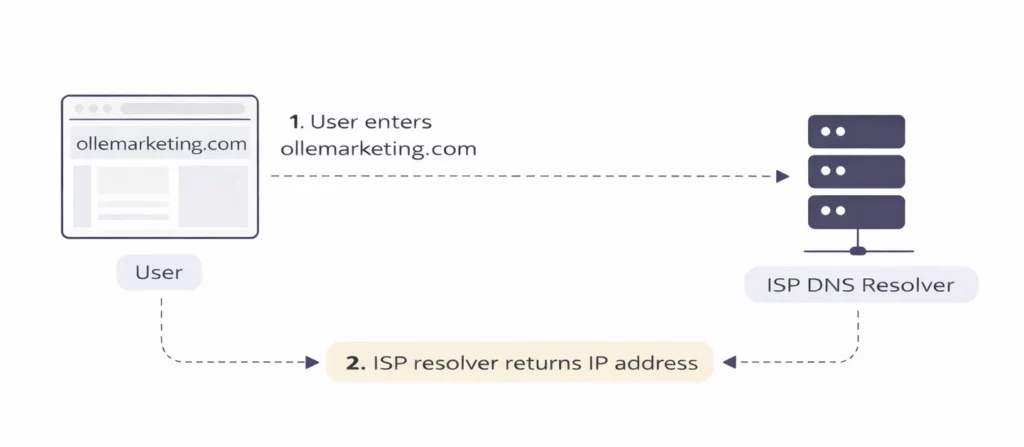
However, if the ISP’s DNS server doesn’t have the IP address for the specific search, it forwards the query to other servers. It contacts any of the thirteen sets of root servers located worldwide to determine where to send the query, see image 4.
What is Search Engine Optimization – SEO?
Understanding SEO
What SEO means in practice
At its core, Search Engine Optimization SEO involves optimizing website content and structure so that search engines are more likely to display it near the top of the results when users search for relevant topics.
SEO is the practice of improving a website so it appears higher in search engine results pages and attracts more organic, unpaid traffic. In simple terms, SEO involves the efforts made to help search engines, such as Google, view your website as relevant, trustworthy, and valuable for specific search queries.
How users find content through search engines
Before you can implement your keywords strategically, it can be highly beneficial to use tools that provide insight into search behaviour.
The right tools help you understand search volume, difficulty, trends, user intent, and competitor behaviour — all of which guide smarter decisions in your SEO strategy.
In this section, you will find a range of trusted platforms that support keyword discovery, content optimisation, and performance monitoring, making it easier to refine your approach and ensure your keywords work as hard as they should.
Why is SEO important?
SEO drives traffic to your website
Although traffic can be generated through paid advertising, social media, and other digital channels, search engines account for the majority of website visits.
Organic search results dominate more space on the search results page, are often perceived as more trustworthy, and receive significantly more clicks than paid advertisements.
Competitive visibility in search results
If your website does not appear near the top of search engines’ search results, it becomes extremely difficult to stand out among competitors. This challenge affects organisations and businesses across almost every industry worldwide.

SEO as a cost-effective long-term strategy
SEO is often the most efficient and cost-effective way for brands to understand their audience and reach them at critical decision-making moments. Unlike paid advertising, which requires ongoing investment to maintain visibility, SEO can continue delivering value over time once it is properly implemented.
Compounding value of high-quality content
High-quality content that ranks well for relevant keywords can generate increasing traffic over time. In contrast, advertising campaigns stop driving visitors once the budget runs out.
Why ranking matters
Search engine results are displayed in a ranked order, and websites appearing at the top receive the largest share of clicks.
Typically, the first result captures around 40–60% of total clicks for a given search, while the second and third results receive far fewer.
Very few users, only about 2–3%, click beyond the first page of search results. This means that even minor ranking improvements can lead to noticeable increases in traffic and potential business opportunities.
AI’s impact on SEO
In the current situation with the evolution of the usage of various AI solutions within marketing and marketing communication, no one really has a complete understanding of the magnitude of the impact it has on SEO. This article doesn’t aim to cover this impact and stray from the importance SEO has traditionally had and still is having.
However, what can be said is that SEO is entering a new phase where AI is changing how people search and discover information online.

AI-assisted search is here to stay, but it will mainly support search rather than fully replace it. Users may rely on AI for quick answers, while still clicking through to websites when decisions matter.
At the same time, discovery will continue to spread across platforms such as search engines, AI tools, social media, marketplaces, and niche communities. As AI makes content easier to produce, trust and authenticity will become even more important, and SEO success will increasingly be measured by more than rankings and traffic alone.
Read more here about what can be expected in 2026 when it comes to AI’s impact on SEO.
The role of DNS settings in SEO performance
This chapter explains what you should consider configure and how. Next chapter will deal about why those choices matter for SEO.
Why DNS settings matter for SEO
DNS settings are a core component of technical SEO, defining how a website’s DNS infrastructure is configured and managed.
While content, keywords, and backlinks receive much of the attention, DNS configuration directly affects how efficiently a website loads, how reliably it remains accessible, and how search engines evaluate its overall performance.
Search engines prioritise fast, stable, and secure websites, making DNS settings an important part of meeting those expectations.
The SEO risks of misconfigured DNS settings
Misconfigured DNS settings can have far-reaching consequences. Slow resolution times, broken redirects, or incorrect records may lead to increased load times, downtime, or inaccessible pages.

These issues negatively impact user experience and can prevent search engine crawlers from properly indexing content, ultimately reducing visibility in search results. In many cases, the effects of poor DNS settings are gradual and may go unnoticed until rankings or traffic begin to decline.
Here follows a few examples of impacts of poor DNS configurations:
Hidden Performance Risks
DNS issues can undermine a website’s performance in subtle but serious ways, often without immediate warning. When DNS is not configured correctly, the effects ripple through both user experience and search visibility.
Slow response times and SEO decline
One of the most common problems is increased latency. Slow DNS responses delay the initial connection between a visitor and the website, extending page load times and creating friction for users. Since speed is a key ranking factor, these delays can negatively influence SEO performance.
Downtime and loss of search visibility
Availability is another critical concern. Incorrect or unstable DNS records can make a website temporarily or permanently inaccessible. When search engine crawlers encounter repeated access failures, they may reduce crawl frequency or interpret the site as unreliable, leading to lost rankings.
Traffic Misrouting and Indexing Issues
Misrouted traffic is also a frequent consequence of poor DNS management. Errors in record configuration—such as incorrectly set aliases or IP mappings—can prevent both users and search engines from reaching the intended destination. This disrupts indexing, weakens authority signals, and degrades trust.

Improving SEO performance through DNS optimisation
Several specific DNS configuration choices are particularly influential from an SEO perspective.
Time to live
Time to Live (TTL) values determine how long DNS records are cached before they are refreshed. Longer TTLs can improve performance for returning visitors by reducing lookup times, but they also make rapid changes more difficult. Striking a balance is essential to maintain both flexibility and speed.
Record configuration
Record configuration is equally important. A CNAME records must be set up correctly to ensure that traffic is routed consistently and without errors. Incorrect configurations can result in redirect loops, downtime, or broken connections, all of which are harmful to SEO.
Leveraging CDNs for global accessibility
Integrating DNS with a Content Delivery Network (CDN) further enhances performance by reducing dependency on a single server location. By routing users to the nearest available endpoint, CDNs lower latency for global audiences and support consistent access during traffic spikes.
For businesses operating globally, proper DNS and CDN alignment is a key factor in maintaining strong SEO performance across regions.

Security-focused DNS settings and trust
Security-related DNS settings also contribute indirectly to SEO success. Measures such as DNS Security Extensions (DNSSEC) help protect against malicious activities like DNS spoofing and traffic interception.
While these protections do not directly boost rankings, they strengthen trust, reliability, and data integrity. Those are factors search engines increasingly value when assessing overall site quality.
Choosing a high-performance DNS provider
DNS optimization begins with choosing a reliable, high-performance provider. DNS services vary significantly in speed, redundancy, and global coverage, and these differences directly affect how quickly users can access a website.
Upgrading to a provider with a robust, distributed infrastructure often results in noticeable improvements in loading speed and stability.
Monitoring and validating DNS records
Regular validation of DNS records is equally important. Monitoring and diagnostic tools help identify configuration errors, performance bottlenecks, or propagation issues before they escalate into downtime or ranking losses. Even small misconfigurations can have disproportionate effects if left unresolved.
Keeping DNS configuration simple and reliable
Simplicity also matters. Overly complex DNS setups increase the risk of errors and make troubleshooting more difficult. A clean, well-documented configuration improves reliability and ensures that changes can be made safely when needed.
DNS as a foundation for long-term SEO
Although DNS operates behind the scenes, its influence on SEO is direct and measurable. A well-optimised DNS environment supports faster load times, stronger availability, and a smoother user experience.
By selecting the right provider, leveraging a CDN, and maintaining continuous oversight, businesses can eliminate technical barriers and create a stronger foundation for search visibility.
Monitoring and continuous DNS optimisation
DNS settings are not a one-time configuration. Continuous monitoring and regular optimisation help identify performance issues, configuration errors, or security risks before they escalate into downtime or lost visibility.
By actively managing DNS settings and adapting them as conditions change, businesses can support faster load times, consistent accessibility, and a stable technical foundation for long-term SEO performance.

Summary
The Domain Name System (DNS) is a foundational component of technical SEO, enabling users and search engines to access websites reliably.
Beyond translating domain names into IP addresses, DNS directly influences key SEO factors such as loading speed, availability, accessibility, and crawl efficiency. Poor DNS performance or misconfiguration can result in slower load times, downtime, and indexing issues, all of which negatively affect search visibility.
DNS configuration choices, including TTL values, record accuracy, CDN integration, and security measures, all play a critical role in maintaining performance and reliability. Because DNS operates continuously behind the scenes, ongoing monitoring and optimisation are essential. When managed correctly, DNS provides the technical stability required for strong, sustainable SEO performance.
The next blogpost in this serie explores how DNS performance affects SEO in practice, focusing on real-world impacts such as page speed, uptime, reliability, and the role of domain names in search visibility.